
How LeadKPI Works
LeadKPI turns your CRM export into immediate visibility on response time breakdowns, follow-up gaps, salesperson accountability, and lead source performance - then delivers a weekly executive report showing exactly where managers should focus to recover missed revenue.

Step 1: Upload Your CRM Export
Export your leads from your CRM and securely upload the file to LeadKPI. No integrations, installation, or workflow changed required - just a simple export from the system you already use.
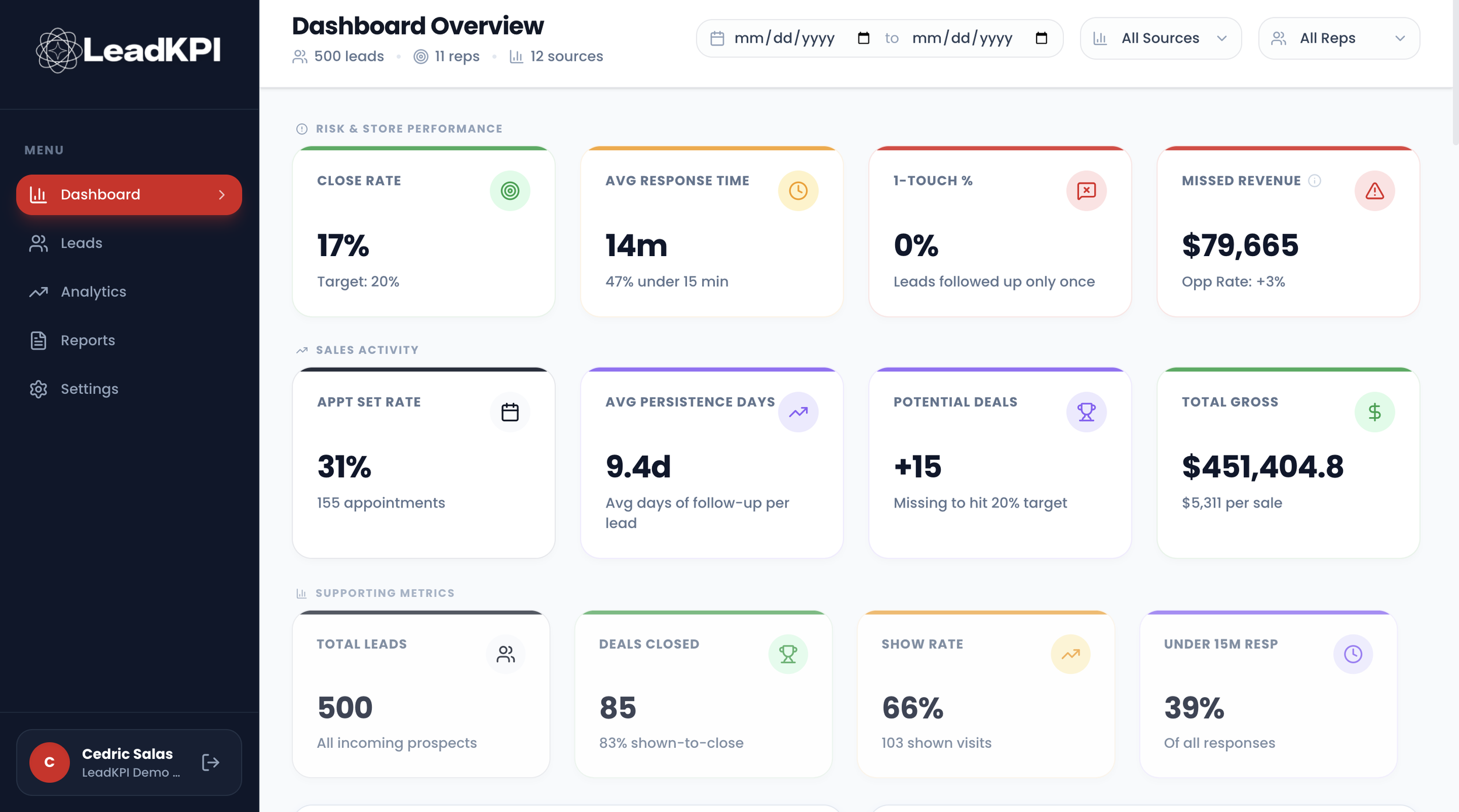
Step 2: LeadKPI Analyzes Store Performance Immediately
LeadKPI surfaces response time breakdowns, follow-up gaps, salesperson accountability trends, and lead source performance within minutes of upload. The dealership dashboard updates right away so managers can see where opportunities are slowing down the same day.

Step 3: Receive a Weekly Executive Report
Each week, managers and owners receive a structured summary highlighting missed revenue opportunities, coaching priorities, underperforming lead sources, and process breakdowns - so leadership meetings focus on actions instead of guesswork.
How managers Use LeadKPI to Improve Store Performance
Identify leads waiting too long for response before opportunities are lost
Catch follow-up breakdowns early and intervene while deals are still recoverable
Compare salesperson accountability across the team to guide coaching conversations
See which lead sources are actually producing deals - and which are wasting budget
Quantify missed revenue hiding inside the CRM
Walk into sales meetings with clear priorities instead of assumptions
What Happens After Your First Upload
Within minutes, LeadKPI highlights response time delays, follow-up gaps, salesperson performance differences, and lead source results across your store. Managers can immediately see where opportunities are slowing down - and where small process improvements can recover additional deals.
Then each week, leadership receives a structured executive report identifying missed revenue opportunities, coaching priorities, and underperforming sources so the team stays focused on what moves performance forward.
No CRM Integration Required
LeadKPI works with a simple CRM export
No installation
No API setup
No workflow changes for your team
Just upload your CRM export and receive insights within minutes
Your Data Stays Private
Each dealership’s data is stored separately and used only to generate your performance reports.
LeadKPI never shares or aggregates store-level data without permission.